

Back
Projects & practice
MiniMax image and video generation for Hermes Agent
A Hermes MiniMax plugin with image-01, Hailuo async video tasks, CN/global endpoint fallback, end-to-end tests, and a PyPI release.
阅读中文原文 · Translated from the original article; source publication date retained
This article records how I connected MiniMax image and video generation to Hermes, providing both backends in one pip package. The implementation covers text-to-image, image-to-image, text-to-video, image-to-video, and subject-reference video.
The response times, file sizes, and resolutions in this article come from the end-to-end tests recorded at the time. API behavior and model limits change. When integrating them, use the current official documentation and actual API responses.
Why MiniMax#
Hermes Agent’s built-in image_generate tool originally supported only a few overseas backends: FAL, xAI, OpenAI, Krea, and Replicate. This MiniMax integration mainly adds two capabilities:
image-01: a single API supports both text-to-image and image-to-image with onesubject_referenceimage, so both can use the same Hermes image-backend interface- Hailuo video models: asynchronous tasks cover text-to-video, image-to-video, first-and-last frames, and subject-reference workflows. The actual successful run in this article is a 6-second, 768P Hailuo-2.3 text-to-video task
MiniMax also has two endpoints:
| Region | Domain | User center |
|---|---|---|
| China, CN | api.minimaxi.com | api.minimaxi.com ↗ |
| International, global | api.minimax.io | minimax.io ↗ |
The plugin selects automatically: CN first for a Chinese account, with global as the fallback.
What implementing a plugin involves#
Hermes’s ImageGenProvider and VideoGenProvider already handle environment-variable loading, URL caching, and error formatting. This plugin mainly adds the request and response logic for two providers:
~/.hermes/plugins/image_gen/minimax/
├── __init__.py        # Business logic
└── plugin.yaml        # Plugin metadata

~/.hermes/plugins/video_gen/minimax/
├── __init__.py
└── plugin.yamlplugin.yaml is minimal:
name: minimax
version: 1.0.0
description: 'MiniMax image generation backend. ...'
author: NousResearch
kind: backendKey points in the image-01 backend#
Most of the work is assembling HTTP requests. A few details in the documentation are not obvious:
-
Use
aspect_ratiorather than size, unlike OpenAI and StepFun:
json{ "model": "image-01", "prompt": "a tiny red apple on a white plate, studio lighting", "aspect_ratio": "1:1", // Not "1024x1024" "response_format": "url", // Can also be "base64" "n": 1, "prompt_optimizer": true } -
Wrap the image URL in
subject_referencefor image-to-image:
json"subject_reference": [ { "type": "character", "image_file": "https://..." } ] -
The response is nested:
json{ "data": { "image_urls": ["https://..."] }, "metadata": { "success_count": "1" }, "base_resp": { "status_code": 0, "status_msg": "success" } }
Assemble the request, call _call_api, get the URL, and use Hermes’s built-in save_url_image to save it to ~/.hermes/cache/images/. That completes the generate flow.
Key points in the Hailuo video backend#
The biggest difference between video and image generation is that video is asynchronous:
1. POST  /v1/video_generation          → task_id
2. GET   /v1/query/video_generation    (poll every 10s) → file_id
3. GET   /v1/files/retrieve?file_id=…  → download_url
4. GET <download_url> → byte stream → local cacheThe timeout policy allows up to 5 minutes per task and polls every 10 seconds. In testing, Hailuo-2.3 at 6s 768P returned in 30-90 seconds; 10s 1080P occasionally took 3-4 minutes. Pay attention to model selection:
| Model | 6/10s | 768P/1080P | T2V | I2V | Subject reference |
|---|---|---|---|---|---|
MiniMax-Hailuo-2.3 | ✅ | ✅ | ✅ | ✅ | ❌ |
MiniMax-Hailuo-02 | ✅ | ✅ | ✅ | ✅ | ❌ |
S2V-01 | 6s only | 1080P only | ❌ | ❌ | ✅ |
One API compatibility issue: the official documentation example uses 720P, but the actual API rejects it. Submitting 720P immediately returns does not support resolution 720P, supported resolutions: 768P, 1080P. My plugin automatically coerces 720P to 768P, so callers do not need to handle it.
End-to-end test results#
image-01 text-to-image, 1:1 square#
a tiny red apple on a white plate, studio lighting, photorealistic

A single image returned in about 5 seconds, at ~150KB.
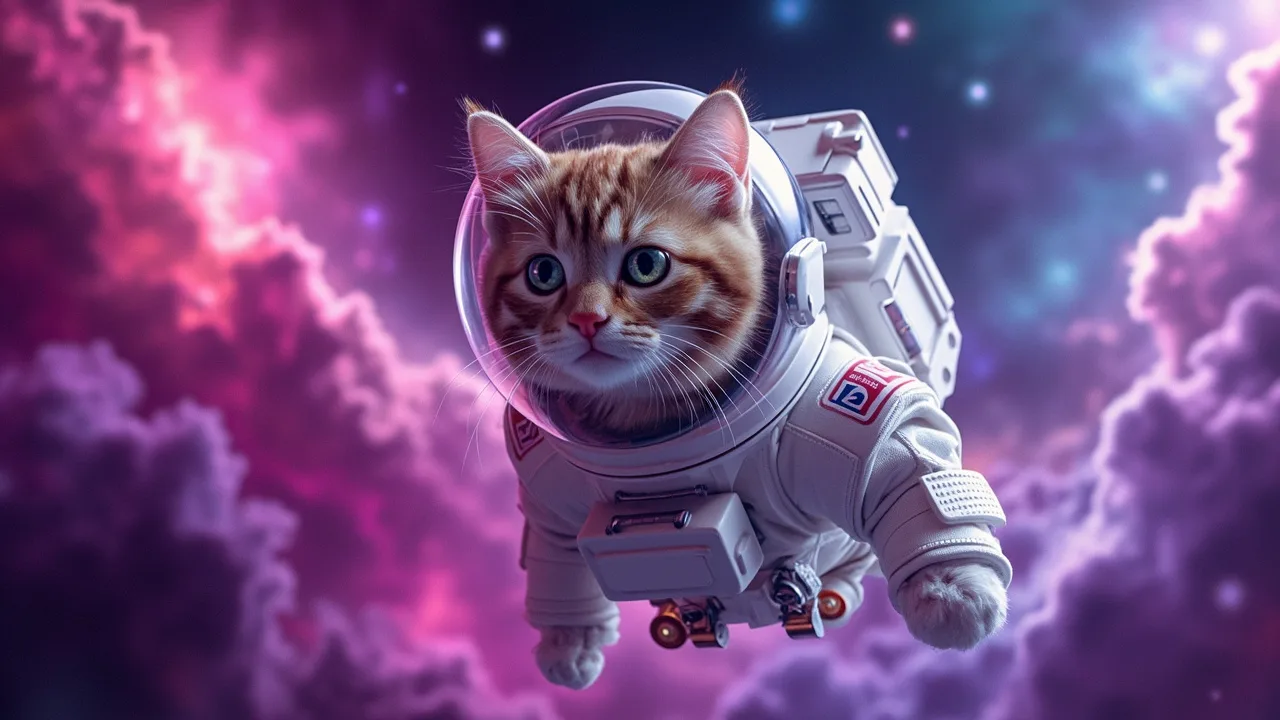
image-01 text-to-image, 16:9 landscape#
a cute cat astronaut floating in a colorful nebula, digital art, vibrant
futuristic tokyo cityscape at night, neon lights, rain reflections, cyberpunk
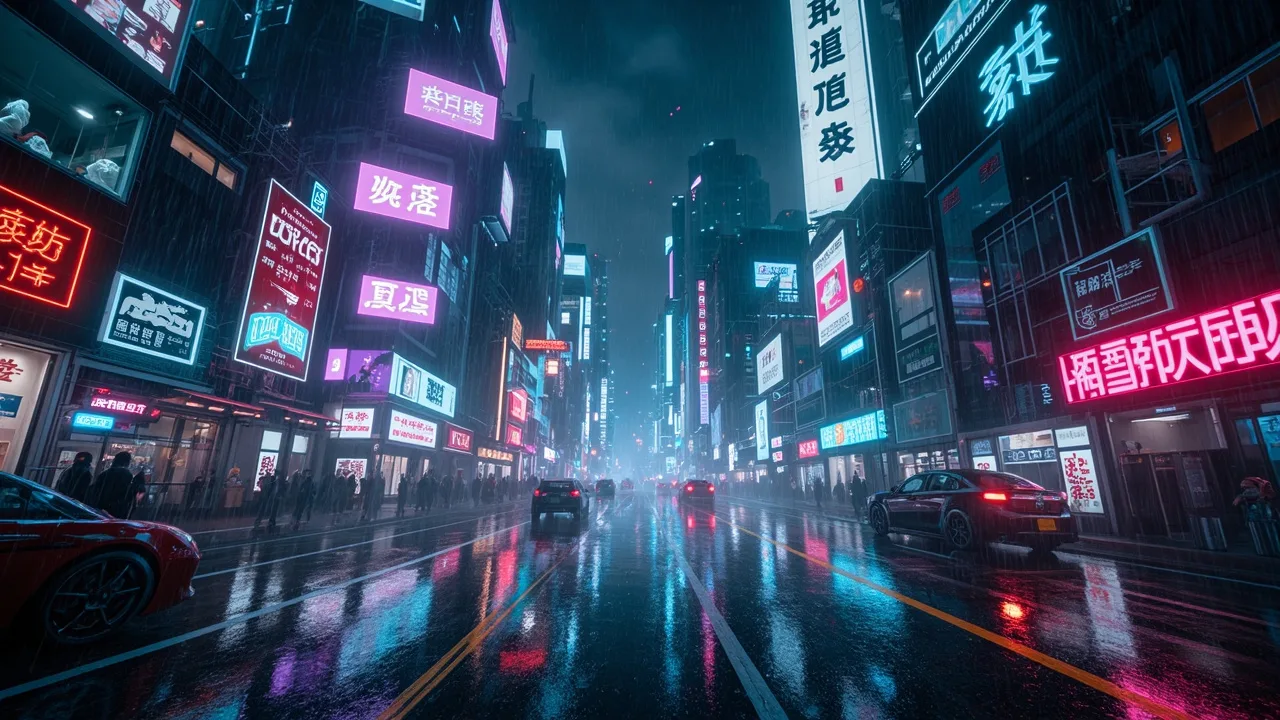
The original generated city image is retained. Its neon signs contain Chinese-looking characters, including distorted text; they are part of the generated scene, not English explanatory labels.
Hailuo-2.3 text-to-video, 6s @ 768P#
a calico cat napping in a sunbeam, soft cinematic lighting, gentle breathing motion
The video demo GIF was removed from the upstream repository. The original MP4 link below remains as a verifiable demo.
It returned in 86 seconds, producing a 1366×768 h264 mp4 with small changes in every frame that suggest breathing.
Local integration steps#
1. Install the package#
pip install hermes-minimax-media2. Configure the keys#
Edit ~/.hermes/.env:
# CN endpoint, the one currently in use
MINIMAX_CN_API_KEY=eyJ...

# International endpoint, as a fallback
MINIMAX_API_KEY=eyJ...3. Enable the plugins#
Edit ~/.hermes/config.yaml:
plugins:
  enabled:
    - image_gen/minimax
    - video_gen/minimax
    # ... Other plugins

image_gen:
  provider: minimax
  minimax:
    model: image-01

video_gen:
  provider: minimax
  minimax:
model: MiniMax-Hailuo-2.3 # Or Hailuo-02 / S2V-014. Restart Hermes#
hermes gateway restartThen say directly to Hermes:
- “Draw a cat wearing sunglasses” → uses image-01
- “Make a 6-second time-lapse of a city at dusk” → uses Hailuo-2.3
- “Animate this photo of ocean waves,” with an
image_url→ uses Hailuo-2.3 I2V - “Make this character wave,” with a photo of the subject → uses S2V-01
What is in the repository#
The whole project is open source at github.com/lora-sys/hermes-minimax-media ↗:
src/hermes_minimax_media/plugins/image_gen/minimax/: image-01 backendsrc/hermes_minimax_media/plugins/video_gen/minimax/: Hailuo video backendtests/: 20 pytest cases that do not require an API key.github/workflows/ci.yml: py3.11/3.12 tests, ruff lint, and automatic PyPI publishing on tagsdocs/assets/: 3 sample images and 1 demo.gif for the README
End-to-end verification record#
Actual results I ran, without mocks:
| Check | Result |
|---|---|
image-01 T2I calling api.minimaxi.com | ✅ Returned a 155KB jpg in 5 seconds |
Hailuo-2.3 T2V async submission | ✅ task_id returned immediately |
| Poll task status every 10s | ✅ Changed to Success at 86 seconds |
Parse file_id + download_url | ✅ Retrieved a 608KB mp4 |
| Automatically choose CN across two endpoints | ✅ Uses api.minimaxi.com when MINIMAX_CN_API_KEY is set in env |
Package import with pip install -e . | ✅ Both providers import successfully |
pytest tests/ | ✅ 20 passed |
ruff check src/ tests/ | ✅ All checks passed |
twine upload dist/* | ✅ https://pypi.org/project/hermes-minimax-media/ ↗ |
How this relates to the earlier StepFun article#
I previously wrote Adding StepFun image generation to Hermes. The workflow is the same: local plugin, PyPI, CI, and blog. The plugins complement each other:
What the two Hermes media backends focus on
StepFun
- step-image-edit-2 took about 1–2 seconds in the recorded tests, useful for rapid iteration
- Image editing is a main capability of the StepFun plugin
- Choose the billing endpoint for your account type
MiniMax
- image-01 covers text-to-image and single-reference image-to-image
- The same plugin family adds Hailuo video generation
- This article verifies automatic CN endpoint selection
Based on the implementation and verification records in the two Hermes plugin articles
Both plugins can be enabled at the same time. Change image_gen.provider in config.yaml to switch without uninstalling either one.
Next steps#
- Run a real
image-01i2i example using subject_reference - Run a real
S2V-01subject-reference video example - Add the
Hailuo-02start-end frame mode by passing two URLs, first_frame_image + last_frame_image
The package has been published as hermes-minimax-media ↗. The repository keeps the installation instructions, current support scope, and planned adaptations.

End of article · Back to writing
Comments
Comments are public and managed through GitHub Discussions.
Preparing the comment section…
Sign in with GitHub once the comment box is ready, or open the repository discussions directly. Open GitHub Discussions ↗Comments are published to the public discussions of the lora-sys/loraSys repository.