

Back
Projects & practice
OpenCloak: replace personal data before sending it to AI
OpenCloak replaces names, emails, and other personal data with stable stand-ins locally, then restores them when the model responds.
阅读中文原文 · Translated from the original article; source publication date retained
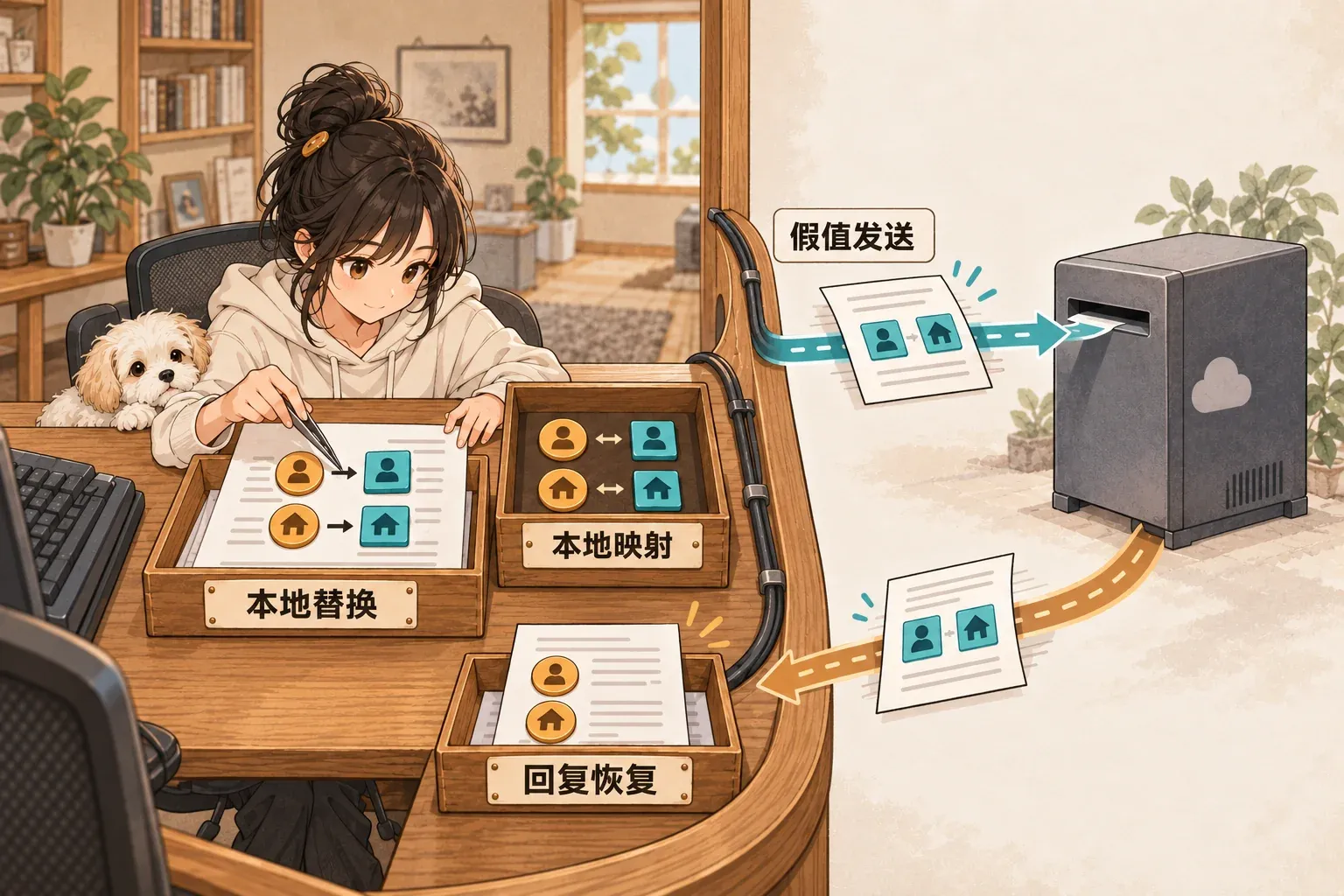
The original cover retains its Chinese labels. They mean “local replacement,” “local mapping,” “send stand-in values,” and “restore the response.” Real values stay in the local mapping while the AI receives their replacements.
Fact check#
- Project name: OpenCloak.
- Author: Arik Chakma. The official repository is arikchakma/opencloak ↗.
- Core function: the browser extension checks prompts for personal information on the local device, replaces detected values with consistently mapped stand-ins, and then sends the prompt to the AI.
- Restoration: when the model replies, the extension restores the user’s original names and terms locally and marks the stand-ins that the model actually saw.
- Local detection: the README says the detection model runs in the browser through WebGPU, with no server and no account required.
- Review before sending: the extension first shows the version that will actually be sent. Users can keep a real value or regenerate an individual stand-in.
- Supported sites: the README lists ChatGPT, Claude, Gemini, Perplexity, Grok, and DeepSeek.
- Installation: the official v0.1.1 release provides
opencloak-0.1.1-chrome.zip, which can be installed through Chrome’s Load unpacked option using the README instructions. - LICENSE: MIT. Third-party models, data, and dependencies retain their own licenses.
- Latest release: v0.1.1, published at 2026-09-20 04:34 +08:00. It fixes restoration matching when a stand-in spans multiple text nodes in a streamed reply.
- Current status: the repository is public and not archived. The README explicitly labels the detection model experimental.
- Demo: the README contains a project thumbnail and complete installation instructions. The repository does not list a separate public web demo. The most reliable demonstration is to install the official release and record actual extension use.
Known limits#
- The author explicitly warns that finding no obvious personal information in a scan does not mean the content is safe.
- The README says the guard against uploads before sending currently covers only ChatGPT. Other sites may upload content before the user presses Send.
- If the extension cannot reliably rewrite a prompt, it refuses to send it rather than passing through the original text.
- If a stand-in happens to be a common word, response restoration may replace occurrences it should leave alone.
Evidence cards#
- Official README ↗: verifies local WebGPU detection, replacement and restoration, supported sites, installation steps, and known limits.
- Official repository ↗: verifies the author, repository status, MIT LICENSE, and current source code.
- v0.1.1 release ↗: verifies the currently downloadable Chrome package and latest fix.
The 30-second version#
OpenCloak is a Chrome extension. When you are about to send a prompt to an AI, it first checks names, emails, addresses, and other personal information locally in the browser, then replaces those values with stand-ins. Before sending, you can see exactly what the model will receive. When the response arrives, OpenCloak restores the original names and terms locally. The interesting part is where the replacement happens, at the sending boundary, and that the mapping can be reversed. The model sees stand-ins while the user continues reading the conversation with their real names and terms.
Why it is interesting#
Many privacy tools simply delete information. Deletion can break context. OpenCloak uses stable replacements. The same real value keeps mapping to the same stand-in, so relationships between people and objects survive across multiple conversation turns. It also makes the pre-send preview an explicit product step. Users can inspect the version about to leave their device instead of having to trust that background rules handled it. Its failure policy is worth examining too. If the extension cannot safely rewrite the prompt, it refuses to send. That choice is better suited to a privacy boundary than silently falling back to the original text.
3 designs worth borrowing#
1. Handle sensitive fields at the sending boundary#
Processing happens before content leaves the device. That location is easy to explain and makes the result easy for users to check.
2. Preserve context with stable stand-ins#
The same real value keeps the same replacement. Relationships in the conversation do not become distorted by fresh random values on every turn.
3. Stop sending when rewriting fails#
When the privacy layer cannot work successfully, the system refuses to continue. This is more controllable than allowing transmission by default.
How this connects to my work#
This mechanism can be adapted to the input gateway of an agent product. In CRM, scheduling, customer support, and multi-agent collaboration, for example, user names, emails, and phone numbers can be mapped locally or at a controlled gateway before reaching models and third-party tools. Restore them within the trusted boundary when displaying results. OpenCloak itself is a tool for personal information in browser prompts. It is not an API key or code-secret scanner. An agent harness can borrow its boundary design, but should not treat it as a general secret-leak prevention solution.

End of article · Back to writing
Comments
Comments are public and managed through GitHub Discussions.
Preparing the comment section…
Sign in with GitHub once the comment box is ready, or open the repository discussions directly. Open GitHub Discussions ↗Comments are published to the public discussions of the lora-sys/loraSys repository.